
Portable CarPlay Screens for Work Vans: A Commercial Vehicle Fit Guide
Evaluate portable CarPlay screens for work vans by vehicle cohorts, mounting, power, audio, driver handover, support ownership and a bounded fleet pilot.
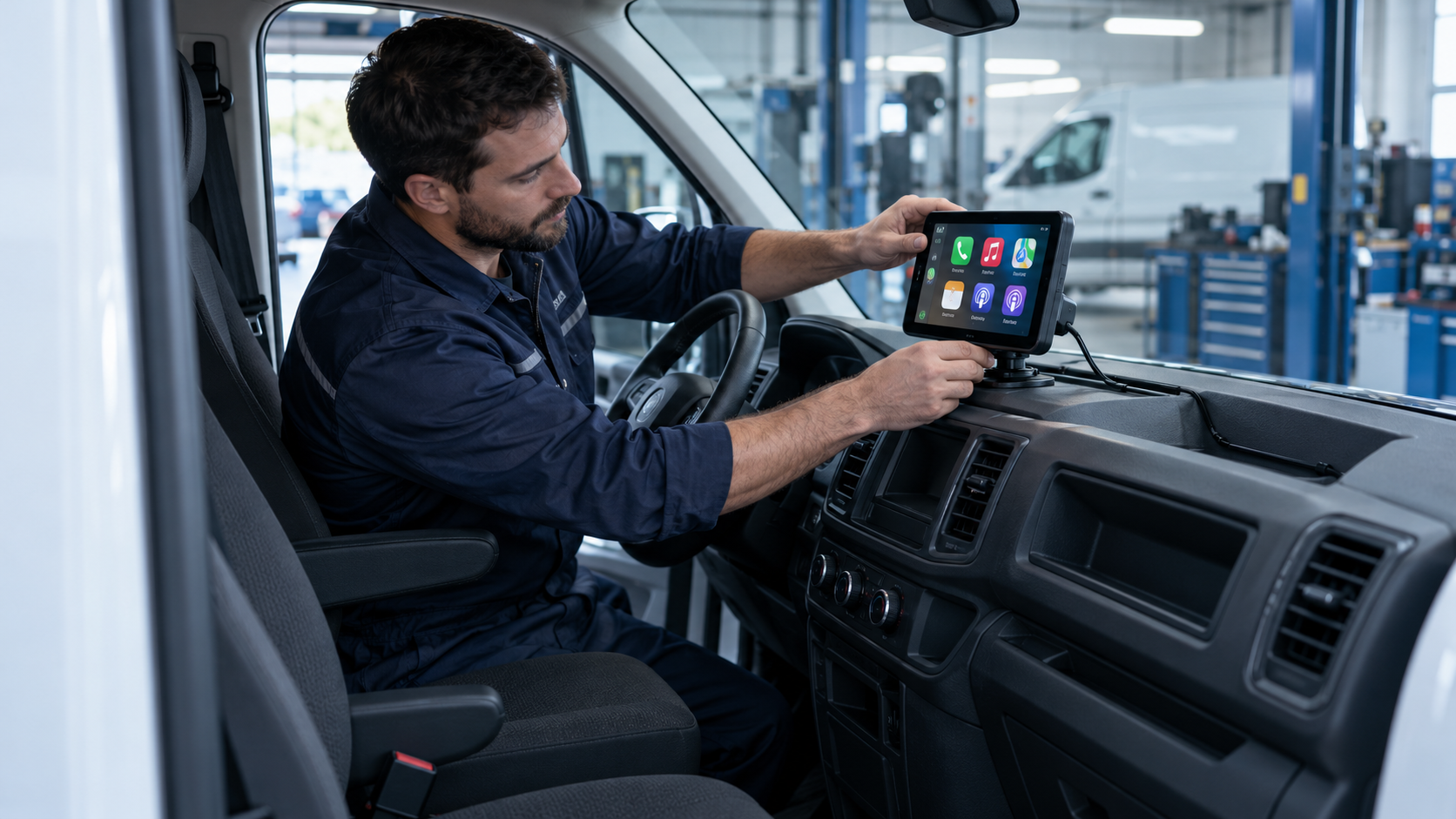
Direct answer: A portable CarPlay screen may suit a work-van program when the operator wants a separate phone-projection display while retaining the factory receiver. Before selecting a model, qualify each van group for dashboard placement, power behavior, audio routing, installation method and driver handover. Then approve the screen, mount, cables, instructions, privacy reset and support route as one controlled kit. Start with a bounded pilot and extend approval only to the vehicle and operating configurations represented by its evidence. A portable screen is not a fleet-management system, does not prove compatibility with every van and should not be positioned in a way that interferes with safe vehicle operation.
For a distributor or upfitter, the useful question is not simply whether a screen turns on in a demonstration vehicle. It is whether the complete accessory and support workflow can be repeated across the customer's actual van population without making assumptions about vehicle electronics, driver behavior or local requirements.
What a portable screen changes in a work van
A portable CarPlay screen is a separate display assembly that presents supported phone-projection functions. Depending on its model, it may connect to a phone wirelessly or by cable, receive power from an accessory outlet or another approved route, and deliver audio through a built-in speaker, Bluetooth, AUX, FM or a combination. These are product-specific options, not category-wide guarantees.
The screen usually leaves the factory head unit in place. That can be relevant when an operator wants to avoid replacing the receiver or when a fleet includes vans with different infotainment systems. It does not mean installation is automatically universal or reversible: the mount, adhesive or suction base, cable routing, power connection and selected audio path still need review.
Start with the commercial van's job
“Work van” covers different operating patterns. A service technician may carry tools and stop repeatedly at customer sites. A delivery driver may follow a planned route and hand the vehicle to another shift. A field-sales van may be assigned for longer periods. A shared pool van may have no fixed driver at all. Each use pattern changes setup, power, privacy, support and maintenance questions.
Write one primary job before reviewing product features. For example:
- provide a consistent phone-projection display in a defined group of older vans;
- give drivers a navigation and call interface without replacing the factory receiver;
- standardize an optional accessory installed during a van upfit;
- support a controlled pilot in pool vehicles with a documented reset and handover.
Do not promise that an accessory will improve delivery efficiency, driver safety or business productivity without evidence for that claim. A product fit decision should identify the intended workflow and observable pilot outcomes, not assume a commercial benefit from the presence of a screen.
Segment the fleet into installation groups
Vehicle badge, body style and model year are only starting fields. Relevant installation conditions can include trim, dashboard geometry, existing equipment, power outlet location and behavior, available audio inputs and any modifications made by a previous owner or upfitter.
| Qualification field | Why it matters | Record before approving a kit |
|---|---|---|
| Dashboard and sight line | Determines whether a mount can hold the screen without obscuring the driver's view or controls | Photos from the driver's seated position, proposed location and review owner |
| Vehicle and trim group | Similar model names may still have different cabin layouts or equipment | Make, model year, trim, body configuration and relevant infotainment details |
| Power source | Outlet location and key-off behavior affect installation and shutdown expectations | Port type, stated rating, ignition state behavior and approved adapter/cable |
| Audio route | The screen and vehicle may use different paths for media, prompts and calls | Available AUX or Bluetooth options, source-selection steps and known limitations |
| Existing accessories | Radios, cameras, trackers and upfit equipment can compete for space or connections | Installed equipment, mounting conflicts and responsible installer |
| Driver workflow | Shared and assigned vehicles create different pairing and reset expectations | Driver changes, pairing owner, privacy cleanup and support path |
Build cohorts from these fields and select a representative pilot vehicle from each material group. A successful installation in one van is evidence about that recorded setup—not automatic approval of every vehicle in a fleet.
Treat mounting and power as part of the product configuration
A screen should be installed in a position that preserves a clear view of the road, relevant instruments and controls. Check the proposed location against vehicle-maker instructions and applicable local requirements. Do not place a display where it may interfere with airbags, control operation, defrosting or driver visibility. The final placement decision belongs with the responsible installer and fleet owner.
Document the approved mount, base, fasteners, adhesive or suction method, cable length, connector orientation and routing. Note the surface condition and any installation or inspection steps required by the selected mount. If a fleet branch substitutes a bracket or cable, that is a configuration change to assess—not an invisible repair.
Power behavior deserves a vehicle-specific check. Confirm startup and shutdown in the intended port, including after a short stop and after the vehicle is parked. Connector shape alone does not establish whether an outlet remains energized, when it powers down or whether an accessory is appropriate for the circuit. Do not infer a vehicle-wide result from one unit or one outlet.
Where hardwiring is considered, define who designs and performs the installation, what vehicle-specific instructions apply, how the wiring is protected and how the original condition will be restored if required. A portable product label should not be used to imply that every installation is non-invasive.
Choose and validate an audio route
Audio is often where a promising demonstration fails to translate into a repeatable fleet setup. The screen may use a built-in speaker, Bluetooth, an AUX input or another model-specific method. The vehicle may also have a radio, hands-free system, amplifier, camera prompts or installed accessories competing for source selection.
For the exact screen and van group, test the sequence the driver will actually use: startup, audio-source selection, navigation prompts during media playback, an incoming call, microphone behavior, volume adjustment, vehicle restart and return to the normal receiver. Record what the system does and what the quick-start instructions tell a driver to do. Do not describe audio behavior as universal if it depends on a particular van, phone, firmware or connection path.
If the customer expects a reversing camera or factory-control integration, confirm the exact model's support and validation before including it in the offer.
Design for driver changes and privacy
Assigned vehicles and shared vans need different pairing rules. For a shared vehicle, determine whether driver phones, wireless network details or recent destinations can remain stored, based on the screen's actual architecture. Define who is permitted to pair a device, when reset is required, what records should be cleared and how staff verify the clean state. Keep personal data out of fleet records unless there is a defined, approved need and an appropriate handling process.
A handover instruction should identify the approved mount and power route, phone prerequisites, audio selection, prior-pairing removal and support contact. If reset does not reach the documented clean state, define whether the unit is quarantined or escalated.
Plan service ownership before scaling
Commercial programs need a clear answer to “who does what when the screen or installation has a problem?” Assign the first response for setup questions, vehicle fitment, missing parts, power issues, audio issues, suspected device failure and warranty evaluation. A distributor may support product setup while an upfitter owns installation workmanship and the fleet owns vehicle access; the exact split should be agreed rather than assumed.
Use a record linking screen serial or batch, hardware and firmware identity where available, van cohort, mount and cable revisions, installation date, installer and service case. This helps separate product, vehicle and installation issues without retaining unnecessary driver data. Define replacement approval, repair return-to-service checks and supplier change notification; keep approved spare mounts and cables distinct from substitutes.
Use this work-van evaluation worksheet
| Decision area | Pilot question | Evidence to retain |
|---|---|---|
| Vehicle scope | Which exact van groups are represented? | Vehicle matrix, photos and inclusion/exclusion boundaries |
| Installation | Can the approved kit be installed consistently by the intended channel? | Work instruction, kit revision, installer notes and exceptions |
| Visibility | Is the proposed position acceptable to the responsible vehicle and safety reviewers? | Approved location and review record |
| Power | Does the screen behave as expected through startup, short stops and key-off? | Vehicle-specific observations and approved power route |
| Audio | Can a driver follow the documented route for media, prompts and calls? | Setup steps, limitations and relevant issue records |
| Handover | Can a new driver pair or start use and remove prior data as specified? | Reset steps and clean-state check |
| Support | Can the first responder identify vehicle, product and installation details? | Escalation map and minimum diagnostic fields |
| Scale decision | What evidence is required to add more cohorts or locations? | Named owner, stop rules, open risks and approval record |
Define the pilot's question and stop conditions in advance. For example, stop and review if a display cannot be located acceptably, the approved power behavior is uncertain, the chosen audio route cannot be explained, or the shared-driver reset is unreliable. A pilot is useful when it can change a sourcing or deployment decision; it is not a marketing demonstration with an automatic scale-up.
Commercial van screen vs. other retrofit routes
| Route | Where the interface appears | Main qualification burden | Often considered when |
|---|---|---|---|
| Portable CarPlay screen | Separate display mounted in the cabin | Placement, mount, power, audio, phone and handover | The operator wants a separate screen while retaining the receiver |
| Wireless CarPlay adapter | Existing compatible factory display | Confirm a working compatible wired CarPlay host and USB data path | The vehicle already has the required wired CarPlay architecture |
| Replacement head unit | Replaces or materially changes the existing receiver | Dashboard fit, wiring, retained functions, installation and vehicle-specific parts | The program accepts receiver replacement and has a qualified install route |
| CarPlay AI Box | Uses a compatible factory display and host | Exact host, controls, software, network and supported features | The buyer wants additional functions on a compatible factory display |
These routes are not interchangeable. The CarPlay AI Box versus portable-screen guide explains the display-architecture distinction. For broader screen mounting, power, audio and sourcing factors, see the portable CarPlay screen buying guide. A commercial van should be matched to the product's actual prerequisites, not to the product name alone.
Limits and boundaries
This guide does not establish fitment, safety compliance, legal placement, electrical approval, privacy-law compliance or performance for a particular van. Requirements depend on the exact product, installation, vehicle, driver workflow and destination market. Obtain review from the relevant vehicle installer, fleet safety owner and qualified market or legal contacts where necessary. Keep any compatibility and benefit claims within the scope of documented evidence.
FAQ
Does a portable CarPlay screen need factory CarPlay in a work van?
Usually the screen supplies its own display and projection path, but the selected product may have specific phone, power, audio, mounting or accessory prerequisites. Confirm the actual model specification and test the intended installation.
Can one screen kit fit every van in a commercial fleet?
Do not assume so. Dashboard geometry, equipment, power behavior and audio inputs can differ. Segment vans into relevant installation groups and approve each group based on its own evidence.
Can a portable screen replace dispatch or fleet-management software?
No. A phone-projection display is not, by itself, dispatch, telematics, driver-monitoring or fleet-management software. Treat those needs as separate system requirements.
What should an operator measure in a pilot?
Measure the outcomes tied to the pilot question: repeatable installation, setup and handover issues, power and audio exceptions, reset completion, support causes, missing parts and vehicle downtime. Set the method and scale criteria before the pilot.
Request a work-van product shortlist
Explore the Smart Car Screen product range, review commercial vehicle solutions and OEM/ODM capabilities, or check the downloads center for available materials. To scope a product shortlist or sample evaluation, share the van groups, dashboard and power assumptions, preferred audio route, driver-change workflow, target markets and support model through the project inquiry form. Do not send personal driver information; vehicle and installation details are enough for an initial review.