
How to Choose Between a CarPlay AI Box and a Portable CarPlay Screen
Choose a CarPlay AI Box or portable CarPlay screen by checking the vehicle display, factory host prerequisites, installation route, buyer job and support needs.
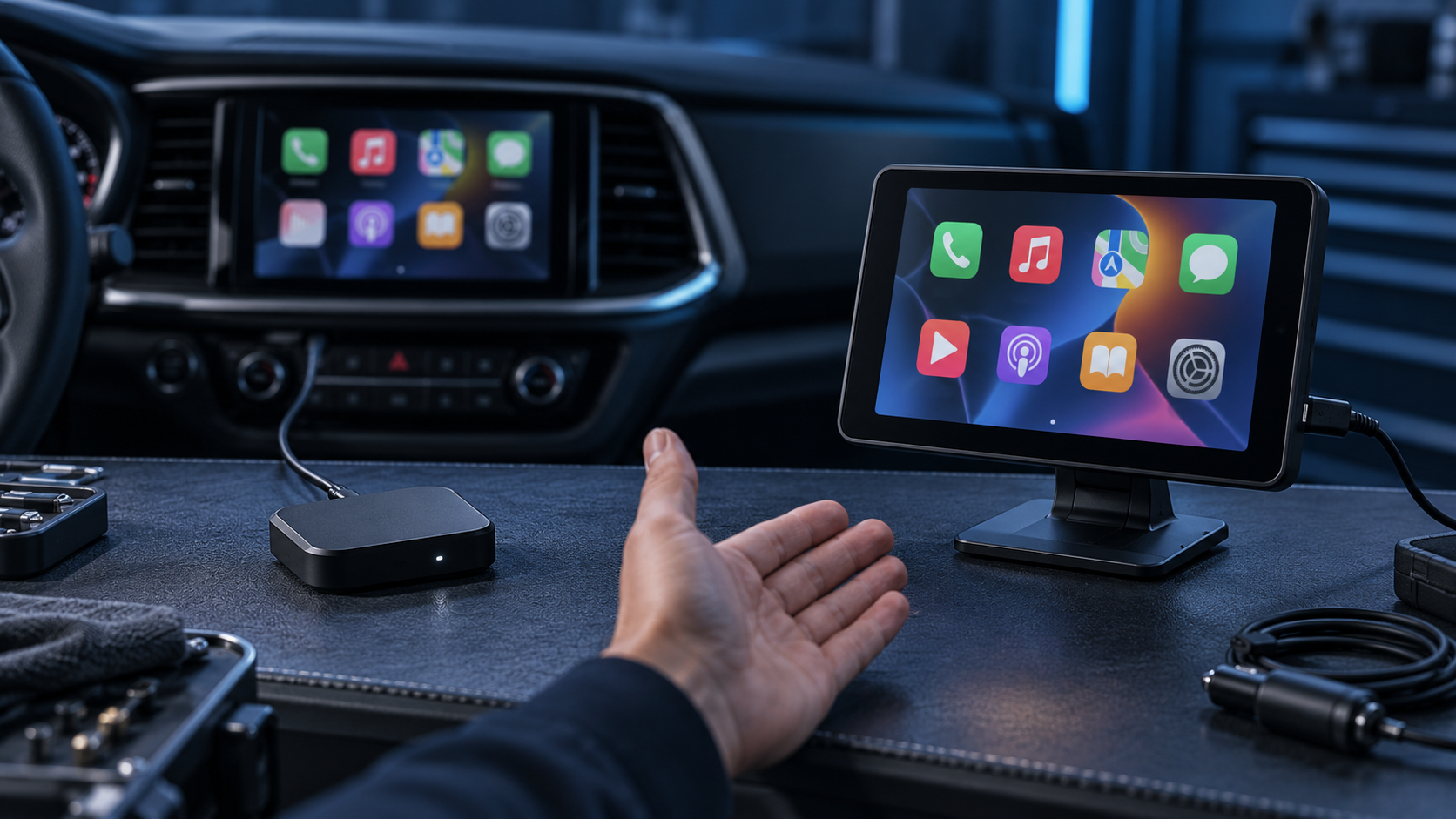
Direct answer: Choose a CarPlay AI Box when the buyer wants additional app-based functions on a compatible factory display and the vehicle meets that exact model’s host requirements. Choose a portable CarPlay screen when the buyer needs a separate display or wants a retrofit route that does not depend on the same factory-screen architecture. The first decision is therefore not which product has more features; it is whether the vehicle’s existing infotainment system is a suitable host or whether the solution needs to supply its own screen. Confirm the SKU’s prerequisites, installation, phone and audio path before recommending either option.
This guide helps distributors, installers and automotive electronics retailers qualify a retrofit request. Actual compatibility depends on the exact product and vehicle configuration.
Define the two retrofit routes
A CarPlay AI Box is a compact device that connects to a supported factory infotainment system and can add an Android-based application environment or model-specific functions. The factory screen remains the visual interface, so the current system, port and supported control method matter. Product descriptions should state the intended host prerequisites.
A portable CarPlay screen, also called a portable smart car screen, is a separate display assembly installed inside the cabin. It can provide a connected-cockpit interface without replacing the factory head unit, but needs a suitable mount and planned power and audio route. Phone, camera or other functions may have model-specific requirements. Visibility and cable routing are part of the fit assessment.
These definitions describe category architecture, not universal fitment. TrolinkTek presents the CarPlay AI Box for compatible factory screens and the Smart Car Screen as an independent display category. Use the exact model specification and validation record for fitment decisions.
A quick decision path
Start with the customer’s existing vehicle rather than the product catalog.
- Does the customer want to keep using the factory display? If yes, investigate an AI Box route. If the customer needs a separate screen, examine a portable screen.
- Does the exact AI Box require a compatible factory CarPlay host, data port or control method? Confirm each requirement for the target vehicle and installed infotainment system. If a prerequisite is missing or unknown, do not recommend that box on assumption.
- Can the portable screen be placed securely and viewed clearly? Check dashboard geometry, sight line, mount options, windshield restrictions that apply to the customer’s location, and whether cables can be routed cleanly.
- How will the customer hear audio and handle calls? Confirm the screen’s supported audio paths, microphone arrangement, phone pairing, vehicle source behavior and expected handover. The exact configuration must be tested or described by the supplier.
- What is the buyer’s primary job? App-based functions on a compatible factory screen and adding a separate connected display are different purchase outcomes. Match the product to the job, not to a longer feature list.
If the customer cannot provide the vehicle or host details, the correct result is “needs qualification.” A request for more information is more useful than an unsupported yes/no compatibility claim.
Compare the routes by buyer requirement
| Buyer requirement | CarPlay AI Box | Portable CarPlay screen |
|---|---|---|
| Display | Uses a compatible factory display | Supplies a separate screen |
| Host dependency | Depends on the specified factory infotainment connection and supported controls | Does not use the same factory display host, but still has product-specific phone, power and audio requirements |
| Typical buyer job | Add model-supported app or connected functions to a suitable factory screen | Add a separate display experience while retaining the original head unit |
| Installation focus | Confirm host, port, software and control prerequisites | Confirm mount, viewing position, power, cable routing and audio path |
| Main qualification risk | Assuming that any factory CarPlay or USB connection is sufficient | Assuming that the screen will integrate with every vehicle’s audio, controls or camera |
| Support questions | Host identification, software, network or app scope, update and reset | Mounting, power, audio routing, phone setup, visibility and accessory fit |
| Better initial channel | Partners able to identify factory infotainment conditions and explain product boundaries | Partners able to demonstrate placement and explain the installation and audio choices |
This is a category-level comparison. It does not replace the SKU’s manual, product specification, supported-host list, sample review or locally applicable installation guidance.
When an AI Box may be the better fit
An AI Box is worth evaluating when the buyer wants the factory screen to remain the primary interface and the vehicle can be confirmed against the exact model requirements. This can suit customers who prefer a compact device and do not want a second screen on the dashboard. For a distributor, it may also fit an installer-led channel that can identify infotainment versions, verify the connection path and explain the difference between standard phone projection and the device’s additional functions.
Ask the supplier for a controlled specification that identifies:
- Required factory host function and supported connection path
- Supported control method and any restrictions on the target vehicle
- Hardware and software identity of the evaluated unit
- Functions that require a phone, network, account or third-party application
- Update and reset behavior, including what is cleared and retained
- Supported languages, bundled accessories and service route
- Known limitations, tested configurations and change-notification process
Do not assume that an AI Box creates a missing factory display host. If a vehicle has no suitable factory screen or the required connection is not present, compare another product architecture instead. Likewise, the supplier’s category description should not be stretched into claims about every vehicle, application, phone or operating-system version.
When a portable screen may be the better fit
A portable screen may fit a customer who needs a display of their own, wants to avoid replacing the head unit, or is considering an older vehicle whose original system does not meet the intended display need. That is a starting hypothesis, not a promise of effortless installation. Each proposed fit still needs a realistic answer for mounting, power, sound, calls, microphone pickup, phone charging, visibility and any selected accessories.
The screen route is easier to explain when the supplier or reseller can demonstrate the complete installed setup. Review the supplied mount and its adjustment range, cable length and routing, the chosen audio method, and what happens when the vehicle’s native radio or another source is active. A feature list may say that several audio routes exist; buyers still need to know which are included, which require accessories and what configuration is recommended for the target scenario.
For cars used by different drivers, also consider the privacy and handover routine. Pairing records, network details and customer data should be handled according to the product’s documented reset and account behavior. For shared or commercial vehicles, the operator should test the turnover procedure before deployment.
A distributor shortlist worksheet
Use this worksheet before suggesting a model or sending an RFQ. It converts a broad inquiry into a product route that can be reviewed.
| Field | What to capture | Why it matters |
|---|---|---|
| Buyer and use case | Retail customer, installer, fleet, rental, dealer or other defined segment | The same vehicle may be used in different workflows |
| Vehicle | Make, model, year range, trim and market where available | Vehicle names alone may not identify the installed system |
| Current display and host | Factory or aftermarket screen, infotainment identity and relevant functions | Determines whether the AI Box host route is plausible |
| Connection | Port type and whether it carries the required data function | A power-only port does not establish host compatibility |
| Desired outcome | Keep factory display and add functions, or add a separate display | Separates the two product architectures |
| Installation conditions | Mounting area, sight line, power source, cable route and driver handover | Important for a portable display recommendation |
| Audio and call path | AUX, Bluetooth, FM, vehicle speaker route or another defined method | Affects call and media expectations and support questions |
| Phone and software scope | Phone type, required applications, network assumptions and update expectations | Helps expose dependencies before sale |
| Evidence and limitations | Exact SKU, sample or report identity, known restrictions and open questions | Keeps claims tied to a controlled configuration |
| Decision | Shortlist, sample evaluation, further qualification or no-fit | Gives sales and technical teams an auditable next step |
Do not fill unknown fields with assumptions. Mark them “unconfirmed” and request the information needed to resolve them. A short, accurate shortlist is more useful than an unqualified compatibility promise.
Common recommendation mistakes
Choosing by feature count. A broader application list does not make an AI Box the right answer if the factory host requirement is unknown. A screen with more connection options is not automatically a better fit if the customer cannot mount or hear it properly.
Treating “CarPlay” as one architecture. Product names can obscure different host, screen, phone and installation dependencies. Describe what the device connects to and which component supplies the display.
Assuming USB means compatibility. A port can supply power without supporting the data path an accessory requires. Verify the exact port behavior and host requirements for the model and vehicle.
Ignoring accessories and support ownership. A mount, cable, camera, remote or localized instruction may alter the complete sellable kit. Confirm what is included and who handles first-line setup or escalation.
Promising a universal fit. Avoid absolute claims. State the checked configuration and route unknown vehicle versions to a sample or compatibility review.
Limits and non-fit conditions
Neither category is universally superior. An AI Box may be unsuitable when the required factory host is absent, unsupported or unknown. A portable screen may be unsuitable when there is no secure, visible mounting position, the required power or audio route is unavailable, or the customer expects seamless integration with factory controls that the product does not provide. In either case, recommend a different solution or pause pending verification.
Local road-safety and installation requirements vary; check the applicable rules and product instructions. Do not infer certification, regulatory status or fitment from a category name or unrelated SKU documentation.
FAQ
Is a CarPlay AI Box the same as a portable CarPlay screen?
No. An AI Box typically uses a compatible factory screen as its display, while a portable screen has its own display assembly. Exact capabilities and prerequisites vary by model.
Does every AI Box work with a factory CarPlay vehicle?
No. Confirm the exact product’s host, connection and control requirements against the target vehicle and installed infotainment system. A general factory CarPlay claim is not a fitment guarantee.
Does a portable screen require factory CarPlay?
The category supplies its own display, so it is not the same factory-host-dependent route as an AI Box. However, the selected screen still has product-specific requirements for a phone, power, audio, mounting and accessories.
Which product is easier for an online retailer to sell?
Neither is always easier. An online offer must make its prerequisites and limitations easy to understand. AI Boxes need host qualification; portable screens need clear mounting, power and audio guidance. Use observed return and support causes to improve the listing.
Can both categories be included in one distributor range?
Potentially, if each has a distinct buyer job, qualification path, support workflow and approved claims. Keep listings and sales scripts clear enough that customers can identify the product architecture before purchase.
What should I send a supplier for a product shortlist?
Provide the buyer segment, use case, vehicle and infotainment details, desired display route, connection and audio requirements, phone/software scope, target channel and any commercial or localization needs. Ask the supplier to identify assumptions and evidence gaps.
Turn the vehicle requirement into a shortlist
If you are deciding between these two routes, share the vehicle group, current screen and host, buyer outcome, intended channel and unresolved connection or installation questions. Review TrolinkTek’s product center and distributor solutions to identify the relevant category; use downloads for available product materials. For a scoped recommendation, request a product shortlist and specify whether you are evaluating AI Boxes, portable Smart Car Screens or both.
Related guides: CarPlay AI Box buying guide for importers and distributors and portable CarPlay screen vs aftermarket head unit.